

Testing internal agents
Check Point AI Red Teaming connects to an agent in one of two ways. The right one depends on whether Red can reach your agent from the internet.
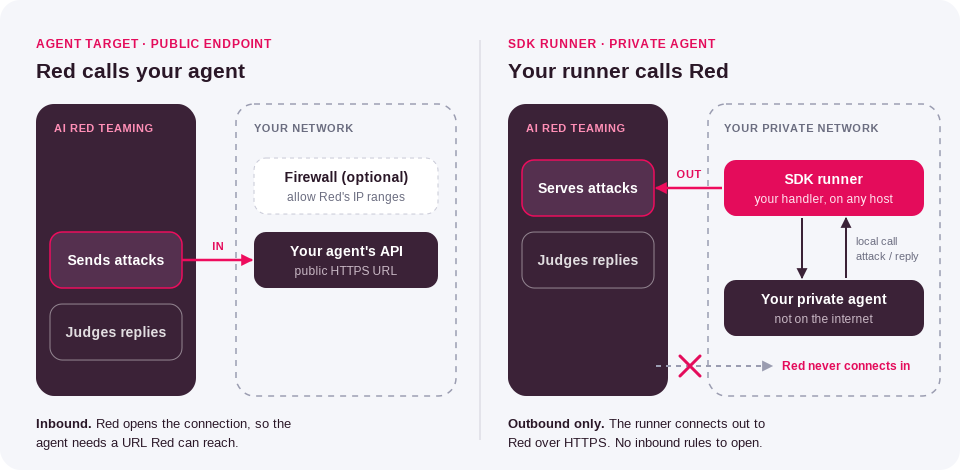
If your agent is public, or you can expose it through an ingress or proxy, use an Agent target and see Network connectivity. If the agent is internal and inbound connections to your network aren’t allowed, use the SDK runner described on this page.
“SDK” covers two separate things. The SDK runner carries Red’s attacks to your agent and returns the agent’s replies. It runs next to your agent and doesn’t change it. Tool tracing is optional: it adds a call inside your agent’s code, and your agent then reports its tool calls to Red. You don’t need tool tracing to test an internal agent. If you turn it on, the agent’s runtime also needs outbound HTTPS to the same Red API host.
How the runner works
The runner is a short script you write with the lakera-red-sdk package (TypeScript
or Python). It works like this:
- You run it inside your network, on any host that can reach the agents under test. One host can test many agents.
- It opens an outbound HTTPS connection to the Red API for your region:
red-webhooks.lakera.aiin the US orred-webhooks-eu.lakera.aiin the EU. It pulls each attack prompt, passes the prompt to your agent with a local call, and returns the agent’s reply on the same connection. - The runner doesn’t listen on any port, and Check Point never opens a connection into your network.
Red generates the attacks, judges the replies, and stores the results. The runner only relays: it passes each prompt to your agent and sends the reply back to Red.
How authentication works
The runner uses two separate credentials:
- Runner to Red. The runner authenticates with a Red Team API Key, which the
quickstart reads from the
LAKERA_RED_API_KEYenvironment variable. Each key is scoped to one folder and only reaches the targets, scans, and results in that folder. See Red Team API Keys. - Runner to your agent. Your handler calls the agent, so it holds the agent’s address and credentials, for example a bearer token from your secrets manager. The SDK never sends them to Check Point.
Data shared with Red lists everything the runner sends.
What you write: the handler
The handler is the only code specific to your agent. It receives each attack prompt, calls your agent, and returns the reply:
TypeScript
Python
Replace the URL, auth header, and request and response fields with your agent’s own.
The rest of the script (create the client, create or reuse a target, create a scan, and
call scan.run(handler)) is the same for every agent. See the
SDK Quickstart for the full script.
Requirements
- A host inside your network that can reach the agent, such as a VM, a container, or a CI/CD runner, with Node.js 22+ or Python 3.11+. See Deployment for runtime details.
- Outbound HTTPS on port 443 to your region’s Red API host. See Network connectivity for the hostnames. Corporate proxies and TLS interception are supported. See Running behind a corporate proxy.
- A Red Team API Key for the folder that holds the target and its scans.
You don’t need inbound firewall rules, a public endpoint, or an allowlist of Red’s IP addresses.
Where results appear
The Red console shows the runner’s targets, scan progress, and scan reports like any
other scan. Each scan also returns a direct link to its report in scan.dashboardLink
(TypeScript) or scan.dashboard_link (Python). To keep a local copy, the runner can
write the results to a JSON file.
Upgrades
You pin the lakera-red-sdk version in your project and choose when to upgrade. The
Changelog lists each release, and the docs for earlier
versions stay available under SDK › Previous versions.
Current limitations
- Scans start from the runner, not the console. To scan on a schedule, run the runner as a scheduled job, for example in your CI/CD pipeline. See Run Scans in CI/CD. Starting or scheduling runner scans from the console isn’t available.
- No packaged image. The runner isn’t available as a prebuilt container image or Helm chart. You install the package and write the handler. To run it in a container, use any Node.js 22+ or Python 3.11+ base image.
Next steps
- SDK Quickstart to run a first scan.
- Deployment for network, proxy, and runtime details.
- Run Scans in CI/CD to scan on every release or on a schedule.