

Trace Agent Tools
Tool tracing takes your red team beyond black-box testing. During a scan, your agent reports each tool call and its result to Red, so evaluation is grounded in what the agent actually did — not only its final reply.
Tracing works for any agent you red team, however you run the scan — a target you connect in the AI Red Teaming platform, or a scan you drive with the SDK. The integration is the same: one outbound call at the tool boundary, in your agent’s own runtime, and it returns the result your agent should use: your tool’s own result while tracing, or potentially a poisoned one during a tool response poisoning scan.
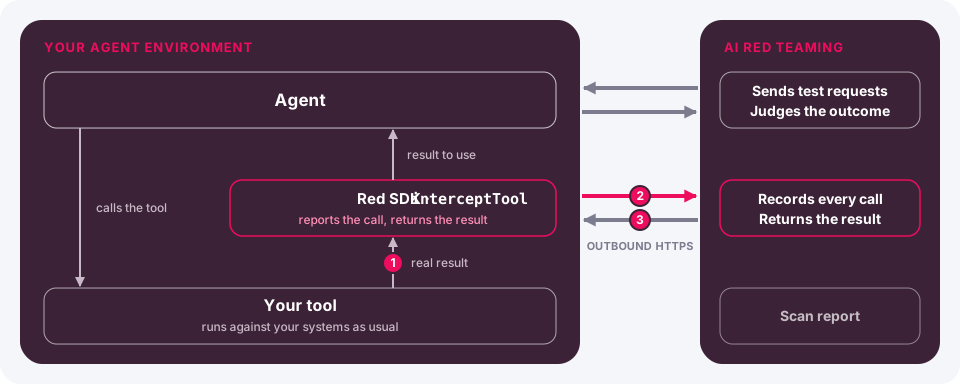
How it works
Intercept each tool result with a single call:
- Your tool runs and returns its result, exactly as today.
- The SDK sends the tool name, arguments, and result to the Red API over HTTPS.
- You get a result back in the same shape — string, number, boolean, null, array, or object. It can contain a poisoned value during a tool response poisoning scan.
Each call carries a session id you supply: your app’s own session, conversation, or thread id. Red uses it to tie the tool activity to the right scan and to line findings up with your own logs.
The call sits at the tool boundary, so it works wherever your tools run — in-process, behind an MCP client, or a custom runtime. No framework adapter.
Prerequisites
- The
lakera-red-sdkinstalled in your agent’s runtime (Node.js 22+ or Python 3.11+) - A Red Team API Key from the AI Red Teaming platform
Enable tracing
Tracing is gated by an environment variable, off by default: unless the environment opts in, every call is a no-op with zero network egress, so it is safe to wire into shared code. Gate the call in your own code as well for explicit control — the flag is the SDK-side backstop that no data leaves an environment that has not opted in.
Inject the API key from your secrets manager at deploy time. Never hardcode it in source or commit it to version control. All traffic is sent over TLS.
Instrument a tool
Call interceptTool (TypeScript) / intercept_tool (Python) where your tool produces
its result, and return what it gives back. Pass the tool name, the arguments as a JSON
string, the result, and your session id. The function is module-level — there is nothing
to instantiate.
TypeScript
Python
Instrument via a dispatch middleware
If your tools already flow through a single dispatch path or middleware wrapper, add the tracing call once there instead of editing each tool. Read the tool name and arguments from the call context, gate on the environment, and optionally scope to an allowlist.
TypeScript
Python
The middleware signature (call, ctx, next) is illustrative — map it to your
runtime’s own wrapper. For MCP or other remote tools, place the call at the MCP-client
boundary, where the tool result comes back.
Both placements are supported: intercept at the source for higher fidelity — the raw result, before any post-processing your tool does (redaction, sanitization, truncation) — or in the middleware, which captures what the model actually receives. Without post-processing the two are equivalent; the middleware is usually less invasive.
Connect tracing to your scan
Red associates reported tool calls with a scan using the session id. How that id is provided depends on how you run the scan:
- Platform targets — a target you connect in the AI Red Teaming platform reports with its own session id, and Red associates it with the scan automatically. No extra step.
- SDK-driven scans — bind the same session id to the scan session in your driver. See Enable Tool Tracing for SDK Scans.
Tool response poisoning
Tracing is also the delivery path for Red’s indirect attack. In a scan that uses the
tool-response-poisoning strategy, Red sends your agent a benign task designed to
trigger a tool call. Red can splice an adversarial payload into the value
interceptTool / intercept_tool returns. Your agent must consume the returned value;
the instrumentation above already does this. Only traced tools can be poisoned, so if
you scope tracing to an allowlist, include the tools you want tested.
Red appends the payload to plain text. For JSON, it appends inside an existing string
field, preferring prose-named fields and skipping fields named like IDs or URLs. This
works for serialized JSON and native objects or arrays, including the MCP
content[].text shape. The returned value keeps its top-level type, and JSON keeps its
structure. If a result has no suitable string, Red leaves it unchanged and tries the
next traced result. Numbers, booleans, and null pass through. A non-JSON string is
treated as plain text, so an appended payload may invalidate another structured text
format such as CSV or XML. If no result can carry a payload, the attack is not
delivered. Outside a poisoning scan, tracing stays observe-only.
The strategy supports SDK relay targets and stateful targets. For an SDK relay target,
call setSessionId (set_session_id in Python) before the first reply. For a stateful
target, report tool activity with the session id the target returned. See
Tool Response Poisoning in the SDK
reference for the strategy options.
Reference
JsonValue
The type of a traced tool result — any JSON value: string, number, boolean,
null, an array of JsonValue, or an object with JsonValue fields. The call accepts
any of these and returns the same shape.
interceptTool / intercept_tool
Reports one tool call and returns the result to use.
TypeScript
Python
Returns the result to use: the value you passed in, or a poisoned one in the same shape during a tool response poisoning scan.
Environment variables
Data and security
- What leaves your environment: the tool name, arguments, and result you pass to the call — over TLS to the Red API.
- What comes back: your real result, except in a tool response poisoning scan, which you start yourself.
- Opt-in: with
LAKERA_RED_TOOL_INTERCEPTunset, the call is a no-op and makes no network request. - Tenancy: requests are attributed to your organization from the API key.
- Session id: your own identifier. Red stores it to associate reported tool calls with the scan and to let you correlate findings with your logs.