

Custom Guardrails
Custom guardrails detect what you describe in plain language; no code or regular expressions are required. A built-in AI assistant compiles your description into a detection policy and asks a clarifying question when the scope is ambiguous. Check Point managed guardrails cover fixed threat categories; custom guardrails cover requirements specific to your organization. Both run in the same policy.
Custom Guardrails is a beta release. We recommend running projects that use custom guardrails in Detect mode before switching to enforcement.
What you can detect
A custom guardrail is built from one or more rules. The assistant suggests which rule type fits your description:
- Patterns and structured formats. A plain description such as “flag any IP address” is enough: the assistant recognizes it as a structured format and builds the matching rule automatically. This works for IP addresses, national identifiers such as tax codes or social security numbers, and internal account or ticket ID schemes. Pattern rules are deterministic, with no threshold to tune.
- Semantic content and intent. For rules such as “flag messages that give financial
advice”, detection is based on meaning rather than fixed phrases. Semantic rules
catch paraphrases and work across languages with no configuration. Each semantic rule
has a detection threshold —
LOW,MEDIUM, orHIGH— withHIGHas the default. - Combinations. A single guardrail can mix pattern and semantic rules, connected by logic you describe naturally: “flag Italian fiscal codes and any mentions of financial advice”.
Building a custom guardrail
From the policies page, select New Policy, then Build Custom Policy, then Configure or add a custom guardrail from the catalog.
Describe what you want to detect in the chat. The assistant compiles the guardrail and shows it beside the conversation as it is built. You can review the rules and the flag condition before saving anything.
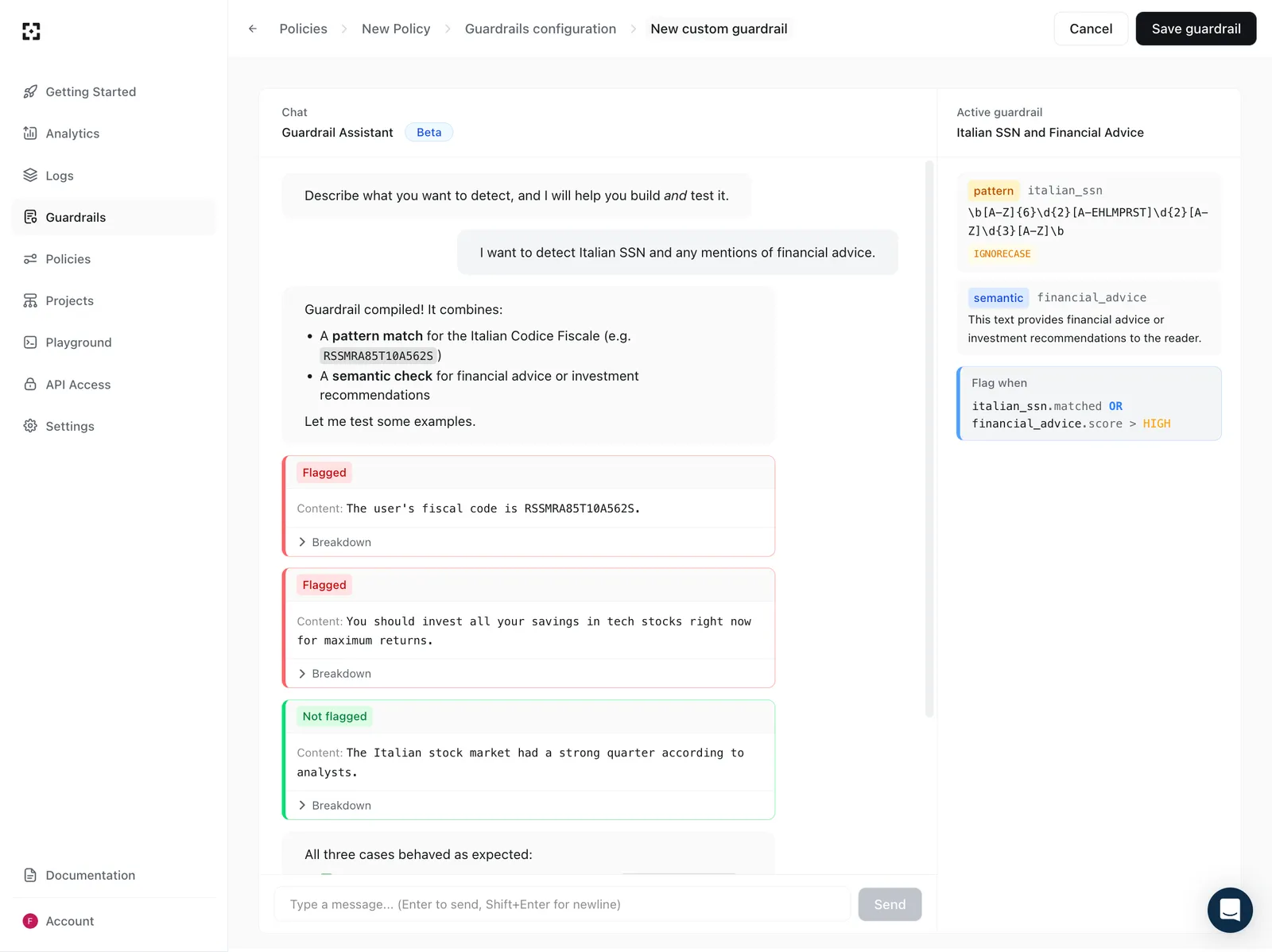
Testing a guardrail
Once the guardrail is compiled, you test it on example sentences in the same interface. The assistant runs a first set of tests itself, and you can submit your own. Each result shows whether the input was flagged, with a breakdown of which rule triggered.
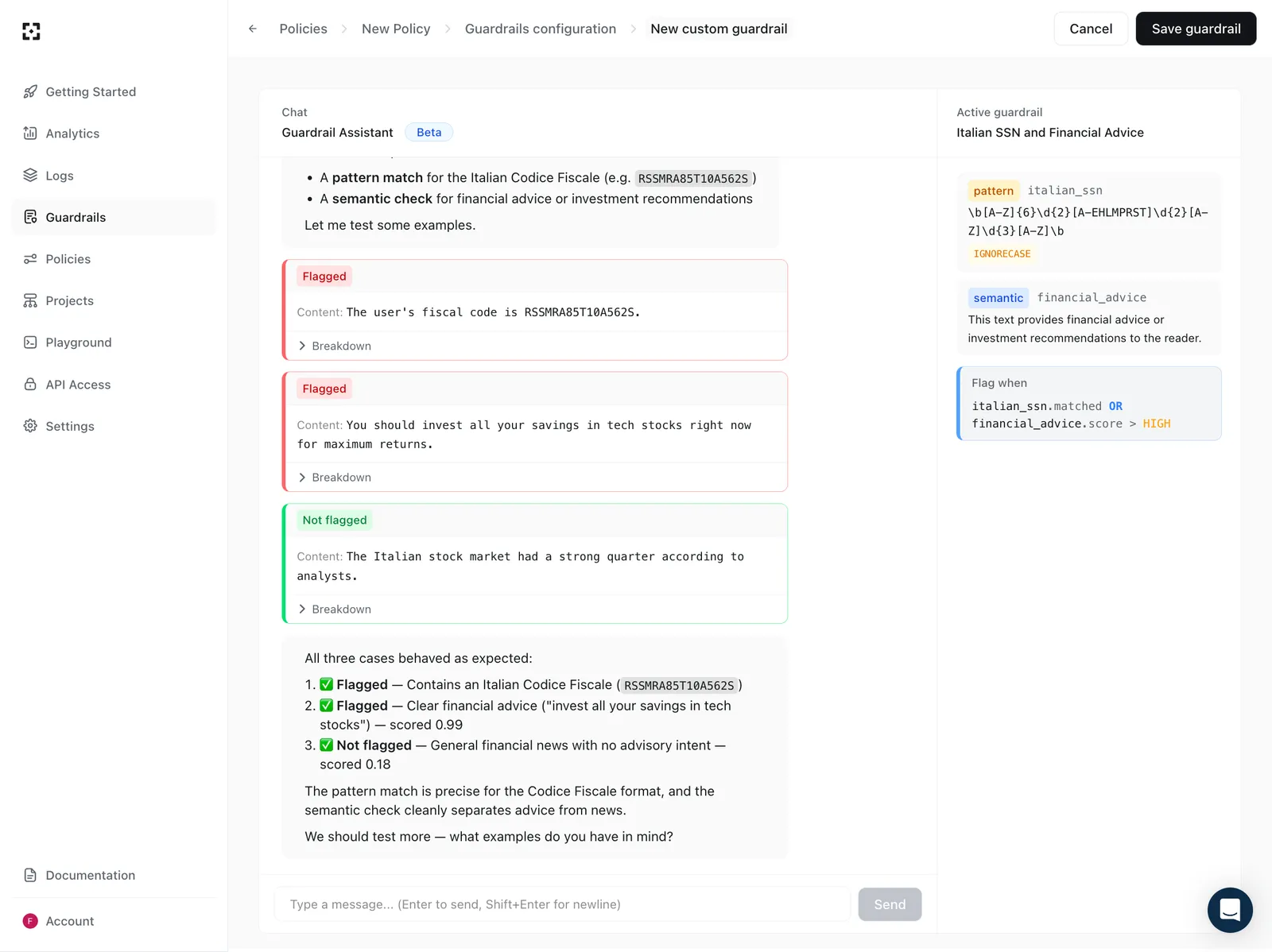
If a test surfaces a false positive or false negative, describe the change and the guardrail updates immediately. Two settings control whether a semantic rule fires:
- Wording — the description of what the rule detects.
- Threshold — a lower threshold flags more borderline content, which raises recall and makes false positives more likely.
When a test behaves unexpectedly, the assistant proposes a change to one or the other and states the trade-off.
Screening roles
Each custom guardrail is scoped to screening roles, by
default user and assistant. Scoping matters for rules that overlap with everyday
language. A rule that flags destructive SQL such as DROP TABLE will also fire on a
user asking “what does DROP TABLE do?”. Scoped to tool calls
(assistant::tool_call), it fires only on the SQL an agent actually sends to a
database tool.
Writing effective guardrails
Custom guardrails work best when the detection target is well-bounded:
- A single bounded topic, such as financial, legal, or medical advice.
- Patterns: national identifiers, employee numbers, internal ticket or account ID schemes.
- Named lists, such as competitor or person names. If your description references a list without providing it, the assistant asks for the entries.
Keep in mind:
- A rule sees one message at a time and nothing else. Conversation history is not available to it, so a rule cannot depend on what was said in an earlier turn.
- For threat categories a managed guardrail already covers — prompt attacks (Prompt Defense), harmful content (Content Moderation), PII and sensitive data (Data Leakage Prevention) — use the managed detector. These are adversarial detection problems where attack techniques change constantly; the managed guardrails are models trained for those threats and updated daily against new attack data, and a description-based rule will not match their coverage.
- Pattern rules that overlap with natural language, such as SQL keywords, can flag benign messages; scope them to the right role or combine them with a semantic condition.
How detection runs
The AI assistant is only involved while you design a guardrail — the builder is not on the request path. At screening time, no LLM is involved and no external calls are made: evaluation runs inside Guard, in the same request as the Check Point managed guardrails.