

Agent Overview
An Agent target lets Check Point AI Red Teaming call your own agent endpoint. Use it when you want Red to test your system through that endpoint.
Configure an agent target
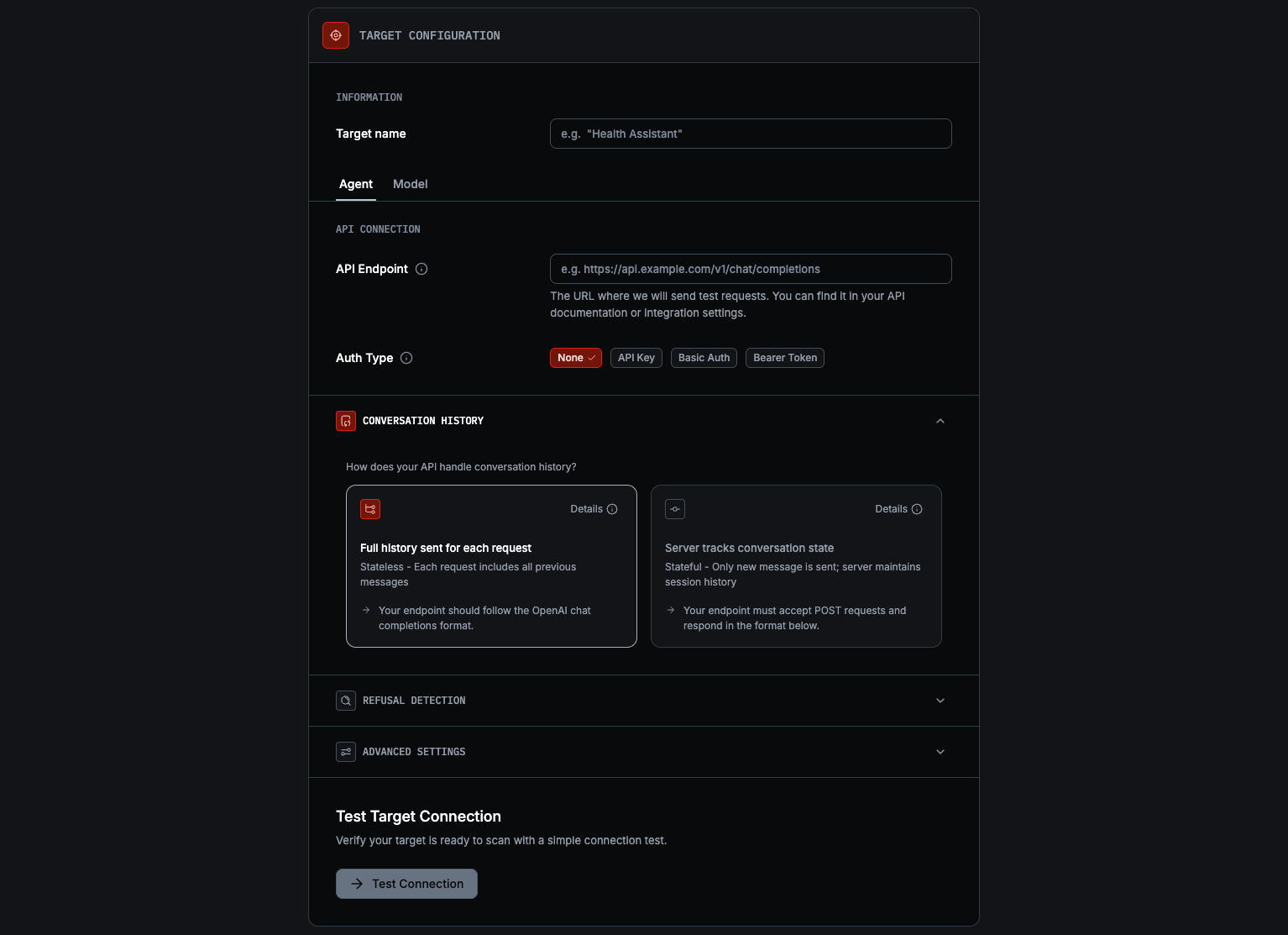
Switch to Agent
Under Target configuration, select Agent. The section heading changes to API Connection.
Fill out your API Endpoint
Set API Endpoint and choose Auth Type: None, API Key, Basic Auth, or Bearer Token.
Choose conversation handling
In conversation history, choose:
- Stateless for APIs that accept the full conversation on every request and follow the OpenAI-compatible chat completions format
- Stateful for APIs that keep session state on the server and exchange a
sessionId
If a Stateful endpoint uses different field names, nests the reply, streams over SSE, or returns the session id elsewhere, map it in Connect your target’s API — see Custom API formats, no wrapper needed. For anything more involved, use a wrapper. See Supported contracts below for the canonical formats.
Review Advanced settings
Use Additional Fields if you need to merge extra JSON into requests. Use Max Concurrent Requests to control how many requests Red sends in parallel.
If your application refuses with specific language (e.g. “This topic is outside my scope”), add those phrases under Refusal Detection so Red recognizes them as refusals. Standard phrases like I cannot help are already detected. During adaptive scans, matched phrases trigger backtracking to try a different approach.
Continue to profiling
Click Continue. Red verifies the connection before advancing—Continue stays disabled until the form is valid, and profiling only begins once the connection test succeeds. Red then creates the target, builds its profile, and lets you review it.
Credentials are stored securely and not shown after saving, so you must re-enter them if you later make changes.
Supported contracts
Red supports two Agent contracts. A Stateful endpoint that differs from the canonical shape can be adapted in the form — see Custom API formats. For endpoints that need more than field mapping, see Need a wrapper instead?.
Stateless
Use Stateless when your endpoint accepts the full conversation history on every request, returns the final response in the same HTTP response, following the OpenAI-compatible chat completions format.
Request
Any Additional Fields you configure are merged into the request body.
Response
Stateful
Use Stateful when your endpoint keeps conversation state on the server and continues
the exchange with a sessionId.
Request
Any Additional Fields you configure are merged into the request body.
Response
On the first request, Red omits sessionId. Your endpoint should create a new session
and return its ID. Red then sends that sessionId on follow-up requests. During Test
Connection, Red sends two messages and verifies that the second response returns the
same sessionId.
Need a wrapper instead?
If your Stateful endpoint only differs in field names, reply location, streaming, or where the session id lives, map it directly in the form — see Custom API formats, no wrapper required.
Reach for a wrapper only when your API needs more than field mapping — multi-step auth, a non-HTTP transport, or multiple upstream requests per turn. See the Creating a wrapper guide.
Auth and settings
Red supports these auth options for Agent targets:
For Additional Fields, use a valid JSON object. If your endpoint is rate-limited or resource-constrained, lower Max Concurrent Requests to avoid timeouts or overload.
If your endpoint runs inside a private network (e.g. EKS in a private VPC), see Networking for exposure patterns and the AI Red Teaming egress IPs to allowlist.
Next steps
- Targets Overview for the full target selection flow.
- Custom API formats to map a Stateful endpoint that differs from the canonical contract, without a wrapper.
- Creating a wrapper for APIs that need more than field mapping.
- Networking for exposing a private endpoint and egress IP allowlisting.
- Connect to a Model if you want to test a provider model directly instead of your own endpoint.